Advanced tools are complex and their interfaces too technical
Dense interfaces and technical controls make advanced renaming harder to understand than it needs to be.
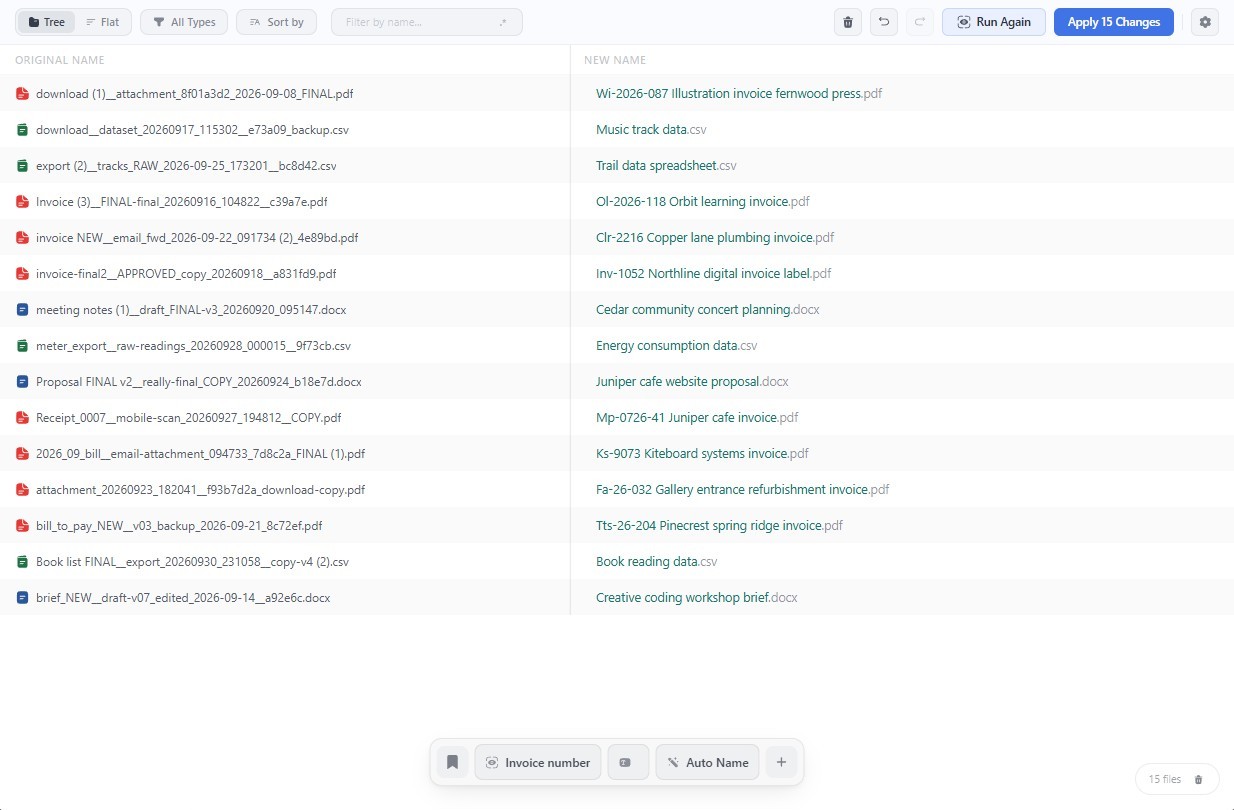
A batch file renamer you build visually. Preview every change, catch conflicts, and undo batches. With local AI, fully private.
Dense interfaces and technical controls make advanced renaming harder to understand than it needs to be.
Advanced renaming operations can require writing regular expressions, scripts, placeholders, or complicated chains of rules.
Dates and tags help, but the most useful naming information often lives inside the file itself.
Running AI privately can require installing models, configuring providers, and connecting separate tools before getting started.
When AI controls the whole filename, keeping results consistent, structured, and understandable becomes more difficult.
Many tools only reverse the latest action without clearly recording every batch and filename that changed.
Arrange names, dates, counters, metadata, folder details, and text operations as visual blocks. Drag them into the order you want and configure each part without learning a complicated rule system.
Review every original and proposed filename side by side. Renamy catches duplicate names and invalid characters before they reach your folders.
Windows file names cannot contain \ / : * ? " < > or |.
Renamy can understand supported documents and images locally, helping extract details or describe content without uploading your files.
Renamy runs its bundled AI model on your computer, with no cloud upload, API key, or separate AI provider to configure. Use it only where it adds value while keeping the rest of the filename predictable.
Renamy keeps a detailed history of completed jobs, including every original name, resulting name, and file status. Review an older batch and roll it back when necessary.
Restores files that are still where Renamy left them.
Save complete naming patterns and bring them back whenever similar files arrive. Your blocks, formatting, conditions, and AI settings are ready without rebuilding the workflow.
Choose an example and follow the blocks from the original filename to the finished result.
Choose how spaces, casing, and special characters should be handled. A single Current Name block turns inconsistent filenames into one clean format.
Stack simple Find & Replace rules to remove repeated prefixes, suffixes, or other unwanted text. Every rule is reflected immediately in the preview.
Add project codes, departments, or status labels as fixed text. Drag each block before or after the original name to control exactly where it appears.
Create a sequence that increments automatically across the batch. Choose its starting value, step, and padding without numbering files individually.
Leading zeros set the padding, e.g. 001 pads to 3 digits.
Excel-style sequence. A continues past Z as AA, AB, AZ, BA.
Add a file’s created or modified date to its name. Choose a ready-made format or write the exact date pattern you need.
Use details already stored in each file, from camera model and resolution to artist, album, or track number. Add a fallback when a value is missing.
Add a block only when its conditions match the file type, name, or folder. One pattern can adapt its output across a mixed batch.
Ask Renamy to extract one precise detail from a supported file. Local AI handles that segment while every other part of the filename stays predictable.
Prompt cannot be empty. Please enter what to extract.
Try the full version with 50 free renames. Make it yours with a single payment.
Perpetual license.
All future updates included.
Explore every feature with your own files before you buy.
Get to know Renamy before you try it.
Yes. Your first 50 renames are free, with access to the full version, including visual patterns, conditions, local AI, saved patterns, and batch history. Try it with your own files before deciding to buy.
Yes. €49 gives you a perpetual Renamy license with unlimited renames and all future updates included. There is no subscription.
No. Build filenames by arranging visual blocks for text, dates, counters, metadata, and more. Configure each block using its controls, then preview the result before applying it.
No. File processing and AI analysis happen on your computer. Your documents and images are not uploaded for renaming.
No. Text, dates, counters, metadata, and other standard naming operations work without AI. Use Smart Extract when you want to include a detail from inside a supported document or image.
No. Renamy includes its own AI runtime and downloads the model for you. There is no separate AI provider to install or configure.
A dedicated GPU is not required. For local AI on Windows, use a 64-bit processor with AVX2 support, such as Intel Haswell or newer, or AMD Ryzen. We recommend at least 8 GB of RAM and 5 GB of free disk space for the app and AI model files. Processing speed varies with your hardware, file contents, and batch size. Standard renaming does not require the AI model.
Renaming and local AI processing work offline once the required AI model files have been downloaded. Downloads, updates, and license activation require an internet connection. License verification includes an offline grace period.
You can rename files regardless of their extension using filename-based patterns. Metadata fields depend on the file type. Smart Extract supports selected documents and images; it does not analyze audio or video content.
Yes. Renamy can use local AI to read scanned PDFs, using the first two pages for visual analysis. Results depend on scan quality and whether the requested information appears on those pages. Always review extracted details before renaming.
Yes. Renamy keeps batch history with original names, resulting names, and file statuses. Open a previous batch to review it and roll back changes. Files must still be available, and changes made outside Renamy can affect whether a rollback succeeds.